
The Cohera blog · Voice
What your captions reflect back to you
Understand your caption style with Voice in Cohera’s Rhythm
By Ella
You know what your work means to you. Finding words that sound like you can be less straightforward, especially when you’re trying to write something suitable for sharing online.
Over time, you may settle into phrases without noticing them. Some feel natural. Others might belong more to what you think a caption should sound like.
The Voice section in Cohera’s Rhythm offers a way to look at those patterns. Its profile draws on recent published posts, reflecting qualities it finds in your writing.
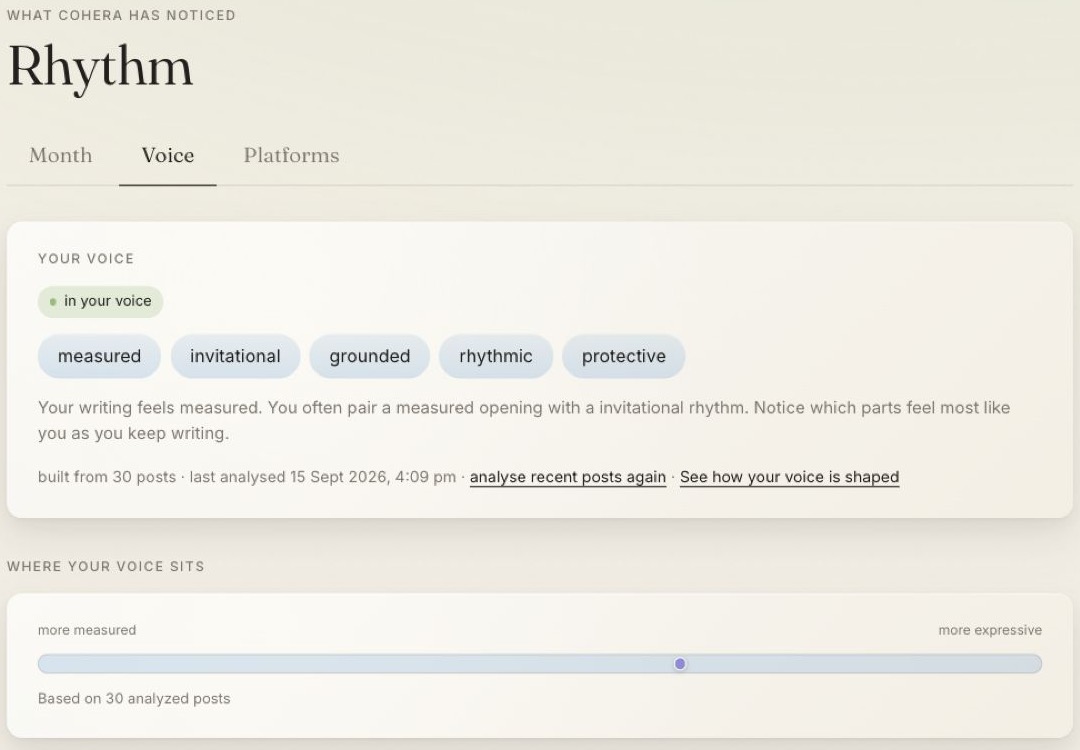
Read the reflection with curiosity
When a voice profile is available, take a moment to consider the qualities it describes. You might recognise yourself immediately, or notice something that doesn’t quite match how you hoped to come across.
The profile is an interpretation of those posts. You still decide whether the description feels useful.
Make the next caption a little more intentional
Start with what you actually want someone to understand. A brief description gives Cohera’s AI caption assistance something to shape, while you keep the meaning in view.
As you read the wording, notice whether you would say it that way. You can keep a phrase that feels familiar, change one that sounds distant or add a detail that matters to you.
Your approved writing examples help guide future caption suggestions. If you change your mind about an example, you can go into Settings and delete it. You can also turn style preferences on or off and save your choices to guide the suggestions. Voice remains a reflection of your recent published posts rather than a store of those examples.
That gives you room to shape the assistance as your voice develops, rather than feeling tied to the way you wrote before.
Leave room for your voice to develop
You may write differently as your work, confidence or interests change. A profile based on recent posts gives you a reflection of a period of writing, rather than a definition you must keep matching.
Return to Voice when you want that perspective. Let it help you notice your language, while leaving the final word with you.